| QuickStart | Tutorials | Download | Purchase | Support |
| Reference | ||||||
 DAuthorize DAuthorize |
 DBuild DBuild |
 DBuy DBuy |
 DCheck DCheck |
 DColorize DColorize |
 DDelete DDelete |
 DDiagnose DDiagnose |
 DEdit DEdit |
 DEmbed DEmbed |
 DExtrude DExtrude |
 DHatch DHatch |
 DHelp DHelp |
 DMerge DMerge |
 DMesh DMesh |
 DOrder DOrder |
 DProject DProject |
 DRead DRead |
 DRemesh DRemesh |
 DRepair DRepair |
 DSeparate DSeparate |
 DUpdate DUpdate |
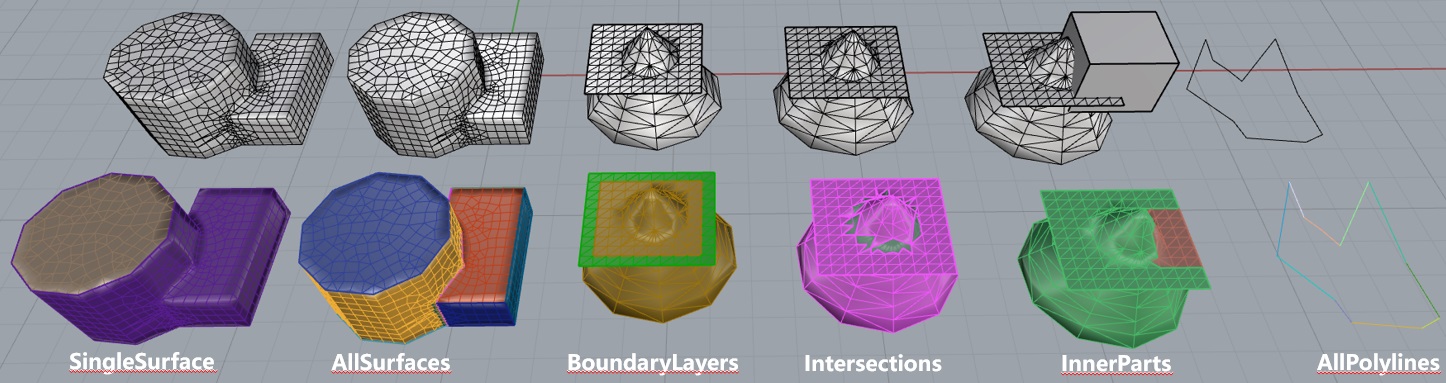
DSeparate command segments meshes and polylines according to user requirements.
This command has the following input parameters:
SeparateMode - Separation mode. If SeparateMode = SingleSurface, a single surface will be segmented according to SeparateAngle (requires selecting a face on the mesh to be separated). If SeparateMode = AllSurfaces, all surfaces will be segmented according to SeparateAngle. If SeparateMode = BoundaryLayers, boundary layers will be segmented. If SeparateMode = Intersections, intersections of multiple faces will be segmented. If SeparateMode = InternalParts, the parts of the mesh inside a solid will be segmented (requires selecting the solid used for separation). If SeparateMode = AllPolylines, all polylines will be segmented according to the separation angle.
SeparateAngle (for SeparateMode = SingleSurface or AllSurfaces) - Defines the separation angle.
AbsoluteAngle (for SeparateMode = SingleSurface or AllSurfaces) - Defines whether SeparateAngle uses absolute angle.
SeparateIntersections (for SeparateMode = SingleSurface or AllSurfaces) - Defines whether to segment intersections.
ExactInside (for SeparateMode = InnerParts) - Defines whether the separated part must be strictly inside the solid.
Select the face(s), mesh(es), or solid(s) to be separated and use this command. The mesh will then be segmented according to the requirements.
Here is an example you can try: DSeparate.3dm.