| QuickStart | Tutorials | Download | Purchase | Support |
| Reference | ||||||
 DAuthorize DAuthorize |
 DBuild DBuild |
 DBuy DBuy |
 DCheck DCheck |
 DColorize DColorize |
 DDelete DDelete |
 DDiagnose DDiagnose |
 DEdit DEdit |
 DEmbed DEmbed |
 DExtrude DExtrude |
 DHatch DHatch |
 DHelp DHelp |
 DMerge DMerge |
 DMesh DMesh |
 DOrder DOrder |
 DProject DProject |
 DRead DRead |
 DRemesh DRemesh |
 DRepair DRepair |
 DSeparate DSeparate |
 DUpdate DUpdate |
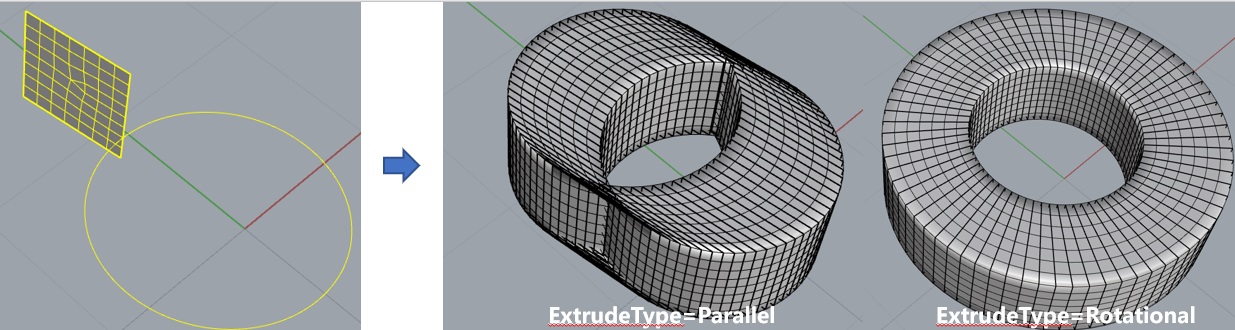
DExtrude extrudes a mesh along a curve.
This command has the following input parameters:
ExtrudeType - Extrusion mode. If ExtrudeType = Parallel, the mesh translates along the curve. If ExtrudeType = Rotational, the mesh translates and rotates along the curve;
KeepInternalMeshes - Whether to keep internal meshes. If KeepInternalMeshes=Yes, internal meshes are kept. If KeepInternalMeshes=No, internal meshes are removed;
CurveMeshControl - Type of curve segmentation. If CurveMeshControl = BySize, the curve is segmented by size, where CurveMinSize = minimum segment size, and CurveMaxSize = maximum segment size. If CurveMeshControl = ByCount, the curve is segmented by count, where CurveMinCount = minimum number of segments, and CurveMaxCount = maximum number of segments;
BreakingAngle = Angle to break the curve into polylines.
Select the curve and mesh to be extruded and run the command. The mesh will then be extruded.
Here is an example you can try: DExtrude.3dm.