| QuickStart | Tutorials | Download | Purchase | Support |
| Reference | ||||||
 DAuthorize DAuthorize |
 DBuild DBuild |
 DBuy DBuy |
 DCheck DCheck |
 DColorize DColorize |
 DDelete DDelete |
 DDiagnose DDiagnose |
 DEdit DEdit |
 DEmbed DEmbed |
 DExtrude DExtrude |
 DHatch DHatch |
 DHelp DHelp |
 DMerge DMerge |
 DMesh DMesh |
 DOrder DOrder |
 DProject DProject |
 DRead DRead |
 DRemesh DRemesh |
 DRepair DRepair |
 DSeparate DSeparate |
 DUpdate DUpdate |
DBuild command builds a finite element model from a set of objects.
Usage Points:
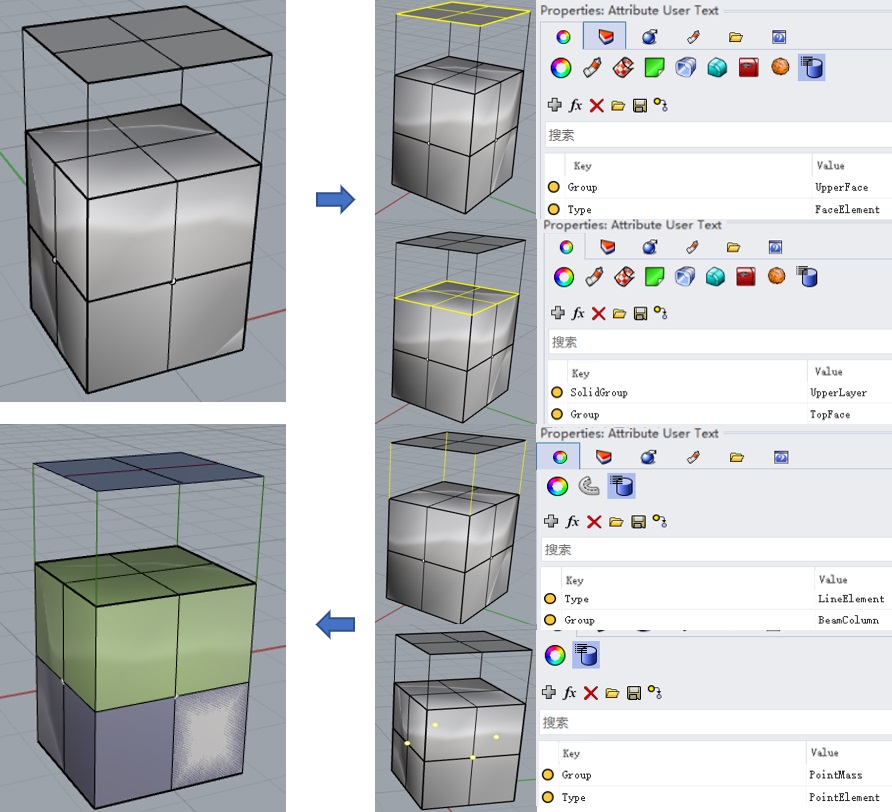
1. Enclosed spaces formed by mesh faces will be generated as solid elements;
2. Adding the "Group" attribute and setting its value to the user attribute text of points, polylines, or mesh faces enables grouping;
3. Adding the "SolidGroup" attribute to the user attribute text of a mesh and setting its value names the solid element group;
4. Adding the "Type" attribute to the user attribute text of a mesh face and setting its value to "FaceElement" generates face elements;
5. Adding the "Type" attribute to the user attribute text of a polyline and setting its value to "LineElement" generates line elements;
6. Adding the "Type" attribute to the user attribute text of a point and setting its value to "PointElement" generates point elements.
The DBuild command generates a finite element model from points, polylines, and meshes, supporting ABAQUS, ANSYS, MULTIFRACS, FLAC3D, NASTRAN, MIDAS, VTK, CSV, etc. The keyword Group can be used to group corresponding objects. Closed meshes will be converted into solid elements and automatically grouped; adding the SolidGroup attribute to a mesh corresponding to a solid element group names that group. Open meshes will be converted into face elements if assigned the FaceElement type. Polylines will be converted into line elements if assigned the LineElement type. Points will be converted into point elements if assigned the PointElement type.
This command has the following parameters:
ElementShape - Solid element shape, which can be Tetrahedron (only tetrahedra) or Mixed (includes tetrahedra, pyramids, wedges, and hexahedra);
BuildMode - Build mode, BuildMode=Strict builds strictly according to the existing model, BuildMode=Smart automatically repairs model errors;
ModelPattern - Finite element model pattern, which can be Unstructured or Structured;
ShapeQuality - Finite element model quality;
MaxGradation - Maximum ratio of edge lengths in mesh faces;
OptimizationLevel - Element quality optimization level;
UnusedNodesForSolidElements - Whether to display objects ignored by the volume mesh generator, where Hide = do not display, Show = display;
ModelName - Finite element model name;
OutputDirectory - Output file path;
OutputFormat - Finite element model format, supports ABAQUS, ANSYS, MULTIFRACS, FLAC3D, NASTRAN, MIDAS, VTK, etc.
Select the points, polylines, and meshes for which to build the finite element model, define FaceElement, LineElement, and PointElement, define Group attributes for different regions for grouping, assign the SolidGroup attribute to a single mesh within a solid element group to name it, then use this command to generate the finite element model. Afterwards, you can only display the layer of the finite element model to view the preliminary model, then import the generated model file into the corresponding finite element software for subsequent analysis.
Here is an example you can try: DBuild.3dm.