| QuickStart | Tutorials | Download | Purchase | Support |
| Reference | ||||||
 DAuthorize DAuthorize |
 DBuild DBuild |
 DBuy DBuy |
 DCheck DCheck |
 DColorize DColorize |
 DDelete DDelete |
 DDiagnose DDiagnose |
 DEdit DEdit |
 DEmbed DEmbed |
 DExtrude DExtrude |
 DHatch DHatch |
 DHelp DHelp |
 DMerge DMerge |
 DMesh DMesh |
 DOrder DOrder |
 DProject DProject |
 DRead DRead |
 DRemesh DRemesh |
 DRepair DRepair |
 DSeparate DSeparate |
 DUpdate DUpdate |
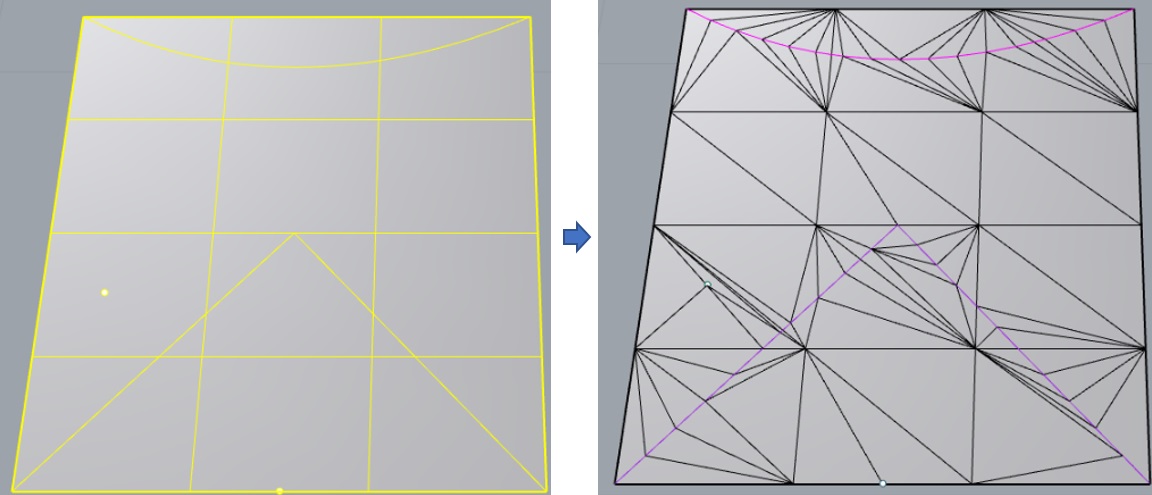
DEmbed command embeds points and polylines into a mesh.
This command has the following parameters:
EmbedIntersections - Whether to generate intersections between polylines and mesh edges, No = do not generate, Yes = generate;
RemeshCurves - Whether to remesh curves, No = do not remesh, Yes = remesh;
When RemeshCurves = Yes, there are the following parameters: CurveMeshControl = BySize, then curves will be divided by size, where CurveMinSize = minimum segment size, and CurveMaxSize = maximum segment size; if CurveMeshControl = ByCount, then curves will be divided by count, where CurveMinCount = minimum segment count, and CurveMaxCount = maximum segment count;
CurveBreakingAngle = breaking angle for splitting curves;
JoinTolerance = join tolerance distance, points smaller than this value will be merged into one point, Auto = automatic judgment, Custom = user-defined.
Select the points, curves, and mesh to be embedded and use this command. After running this command, the points and curves will be embedded into the mesh.
Here is an example you can try: DEmbed.3dm.